The all-in-one practice manager built for modern law chambers.
Log case briefs, schedule timelines, track financial ledgers, and manage daily diaries in a single, secure cloud database workspace designed for advocates.
Designed to cater to advocates practicing across district courts, high courts, supreme court and tribunals.
Practice Growth
Scale Your Law Practice to a Top-Tier Firm
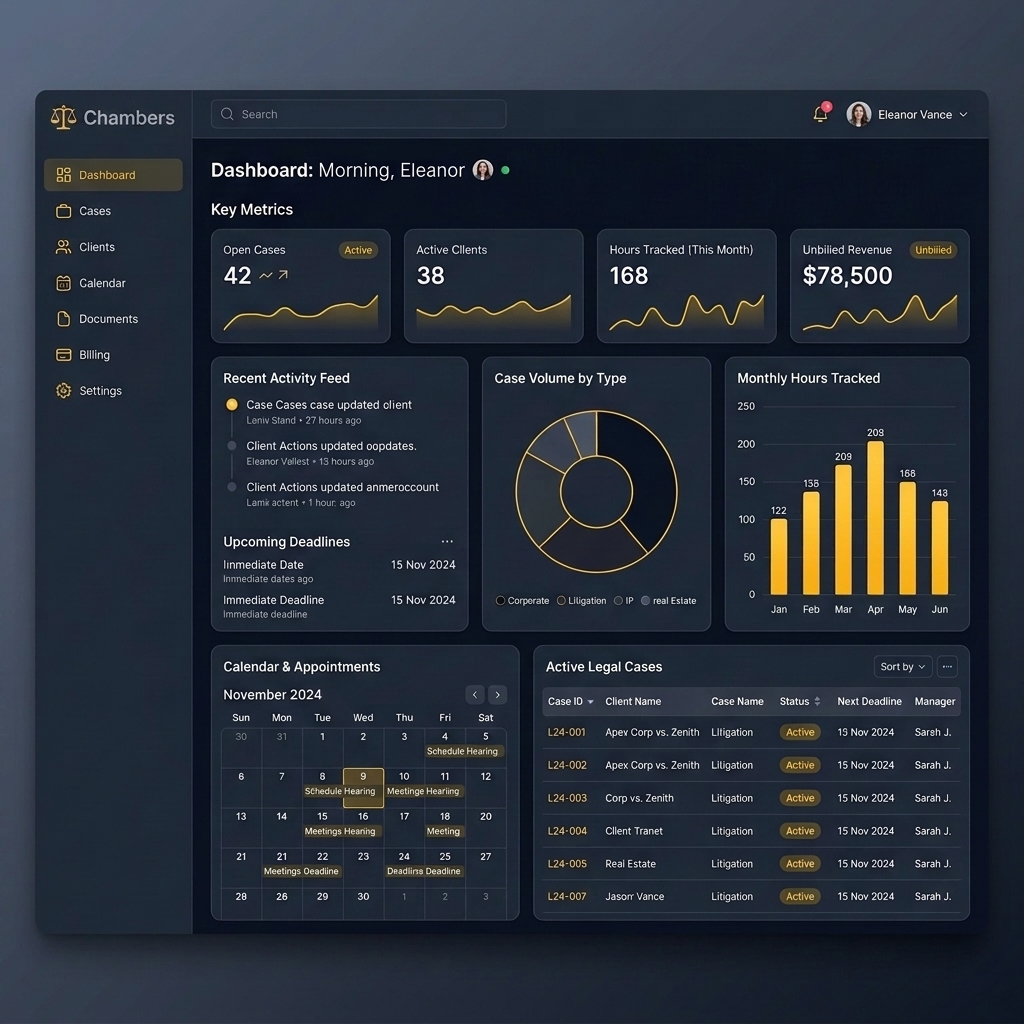
Advocates run their chambers on intuition rather than intelligence because they lack metrics. With Chambers, you can track the vital data points of your practice in real-time, allowing you to grow client retention and expand revenue streams.
Client & case database — Maintain complete client and case records in one secure place
Daily hearing diary — Track hearing dates, case trajectory, and status history at a glance
Finances & revenue insights — Monitor monthly and annual income, and see which case types pay you the most
Client updates & invoicing — Keep clients informed on case progress while billing them seamlessly
Most lawyers struggle to scale because they lack metrics. Chambers enables structured networking by showing you exactly which contacts refer the highest volume of converted, closed litigation business, helping you prioritize high-yielding professional relations.
Maintain comprehensive litigation case dossiers, client histories, court briefs, stages, and CNR number dockets.
Daily Diary & Listings
Track daily court board listings, next dates, and automatic calendar reminders for unlisted active matters.
Client Onboarding Wizard
Streamline new client intakes with structured contact logs, custom billing retainers, and setup wizard forms.
Advocate Ledger & Billings
Manage professional advocate ledgers, invoice bills, received payments, outstanding balances, and expense reports.
Referrals & Network
Track case referral sources, cultivate professional relationships, and analyze inbound networking leads value.
Client Intimation Assistant
Auto-generate formatted case summaries, listing alerts, and payment due intimation templates to send via WhatsApp.
Case Tracking & Registry
Maintain complete litigation details, historical hearing logs, registry stages, and docket histories. Chambers stores active briefs, CNR number tracking, court benches, opposition party advocate details, and next scheduled listing dates securely in a single, unified view.
Active Cases
Case TitleStatusNext Listed
Apex Corp vs. Zenith LtdACTIVE15 Aug 2026
State of Rajasthan vs. VermaACTIVE22 Aug 2026
M/S Builders vs. Municipal CorpPENDING10 Sep 2026
Niche & Revenue Share
Corporate Litigation₹4,50,000 (55%)
Civil Property Disputes₹2,10,000 (26%)
Criminal Defense₹1,20,000 (15%)
Automated CNR Sync
Live tracking of orders and scheduled dates.
Document Vault
Attach petitions, briefs, and judgements securely.
Opposition Log
Quick access to opponent details and judges directory.
At Track My Chambers, we understand that legal practitioners handle highly sensitive and confidential data. Protecting your chamber's privacy and your clients' cases is our highest priority.
1. Data Storage & Hosting
All your chamber data, case records, financial ledgers, and client lists are securely hosted on MongoDB Atlas cloud servers. The database is isolated per tenant, ensuring that your data remains completely confidential and inaccessible to other chambers.
2. Encryption Guardrails
All data processed by Chambers is encrypted in transit using secure HTTPS protocols (SSL/TLS). Confidential case materials, client details, and passwords are also encrypted at rest within our databases to prevent unauthorized disclosures.
3. Data Export & Ownership
You retain 100% ownership of your data. You can download a complete backup of your case lists, financial logs, and client sheets in a standard JSON format at any time directly from the System Settings panel.
Terms of Service
Last updated: July 13, 2026
Welcome to Track My Chambers. By registering a chamber account, you agree to comply with and be bound by the following terms of service.
1. Chamber Accounts
You are responsible for safeguarding your lead advocate credentials and password. Track My Chambers cannot and will not be liable for any loss or damage arising from your failure to comply with account security obligations.
2. Practice Records & Backups
While we provide secure cloud storage, you are encouraged to periodically export a local JSON database snapshot from your Settings page to safeguard against any accidental data deletes or modifications.
3. Fair Use & Fees
Chambers is billed on a monthly subscription model. We reserve the right to suspend access to your cloud dashboard in the event of continuous unpaid billing statements.
Core Modules
Chambers Feature Suite
Explore the built-in practice modules designed to streamline operations, automate client notifications, and secure your advocate ledger.
Case Tracking & Registry
Maintain comprehensive litigation case dossiers, client histories, court briefs, stages, and CNR number dockets.
Daily Diary & Listings
Track daily court board listings, next dates, and automatic calendar reminders for unlisted active matters.
Client Onboarding Wizard
Streamline new client intakes with structured contact logs, custom billing retainers, and setup wizard forms.
Advocate Ledger & Billings
Manage professional advocate ledgers, invoice bills, received payments, outstanding balances, and expense reports.
Referrals & Network
Track case referral sources, cultivate professional relationships, and analyze inbound networking leads value.
Client Intimation Assistant
Auto-generate formatted case summaries, listing alerts, and payment due intimation templates to send via WhatsApp.
Case Tracking & Registry
Maintain complete litigation details, historical hearing logs, registry stages, and docket histories. Chambers stores active briefs, CNR number tracking, court benches, opposition party advocate details, and next scheduled listing dates securely in a single, unified view.
Active Cases
Case TitleStatusNext Listed
Apex Corp vs. Zenith LtdACTIVE15 Aug 2026
State of Rajasthan vs. VermaACTIVE22 Aug 2026
M/S Builders vs. Municipal CorpPENDING10 Sep 2026
Niche & Revenue Share
Corporate Litigation₹4,50,000 (55%)
Civil Property Disputes₹2,10,000 (26%)
Criminal Defense₹1,20,000 (15%)
Automated CNR Sync
Live tracking of orders and scheduled dates.
Document Vault
Attach petitions, briefs, and judgements securely.
Opposition Log
Quick access to opponent details and judges directory.
"Most lawyers lack data about the growth of their own practice and thus struggle to scale it to top-tier law firms. Chambers bridges this analytics gap to help you build a data-driven chamber."
In the legal profession, managing caseloads manually creates an operational ceiling. Advocates spend hours parsing physical listing boards, tracking outstanding billing ledgers, and manually copying case briefs for client updates. This manual administrative overhead locks lawyers in a loop of administrative friction, preventing them from growing their practice.
How Chambers Powers Practice Scaling
01
Data-Driven Client Growth & Referrals
By recording referral sources for every case, Chambers tracks exactly which channels bring in your highest-yielding litigation work. This visibility allows advocates to target business relationships and networking efforts where they yield the maximum return.
02
Plugging Revenue Leakage with Ledgers
Chambers categorizes payment statuses (Billed, Received, Outstanding, Disbursed, WrittenOff). The dashboard flags high outstanding accounts instantly, enabling prompt billing collection reminders. This structured approach helps advocates reduce outstanding dues by up to 35% in the first quarter.
03
Operational Leverage through Delegation
Instead of storing case updates in a physical diary, Chambers puts everything in a secure cloud workspace. Advocates can easily delegate diary entries, listings, and invoicing work to junior associates, allowing the firm to scale and handle larger case volumes effortlessly.
Pricing Plans
Simple, Transparent Plans
Choose the plan that fits your chamber's operations. No hidden onboarding fees.
Monthly Plan
₹399/month + GST
Includes complete access to all features: Unlimited cases & clients, daily diaries, invoicing & advocate ledgers, WhatsApp notifications, and secure backups.
Download your complete onboarding details, case notes, diary logs, and income ledgers.
You can save this file securely on your computer as a database snapshot.
Restore Database (JSON Import)
Select a previously downloaded `.json` backup file to overwrite/restore the practice database.
Warning: This will replace all existing entries.
No file selected
Factory Reset Practice Data
Completely erase all clients, cases, diaries, and transactions. Resets the application to fresh mock seed states. This action is irreversible.
Track My Chambers - Advocate Practice Playbook & User Guide
Welcome to your interactive operational playbook for maximizing chamber efficiency, revenue tracking, client satisfaction, and case diary management. Use the real-time search engine or jump menu below to navigate features.
5-step quick start walkthrough to initialize your digital chamber suite
Quick Start Walkthrough Flowchart:
Step 1: Register Chamber
→
Step 2: Verify Email OTP
→
Step 3: Onboard First Client
→
Step 4: Register First Case
→
Step 5: Dashboard Overview
Real-Time KPI Cards
Monitor active clients, pending cases, monthly income, outstanding client dues, today's listed hearings, and pending delegated tasks in one centralized screen.
Adaptive Quick Action Button
The top-right header button dynamically transforms based on your active module (e.g. Log Payment on Dashboard, Register Case on Cases).
Global Search Bar (`Ctrl + K`)
Type any keyword into the top navigation search bar to instantly query clients by name, phone, or email, and cases by title, CNR number, or court forum.
2
📅 Daily Workflow: Diary & Hearings
Court hearing diary, 4 calendar view modes, and printable daily cause lists
Registering & Tracking Cases:
Go to Case Registry → Click Register Case → Select client, specify title, CNR number, legal category (Civil, Criminal, Matrimonial, Consumer, Service, Legal Notice, Contracts, Consultation), court forum, and current stage.
Recording Hearing Outcomes:
Click Record Hearing on any case card → Input today's hearing date, stage/purpose (e.g. Arguments, Evidence), summary of court directions, and listed next hearing date.
4 Calendar View Modes:
Switch seamlessly between Month, Week, Day, and Year views to plan hearing schedules and court appearances ahead of time.
Day Pop-Up & Cause List Printing:
Click on any date cell to view all listed hearings for that day. Click Print Cause List to generate a clean paper cause list to carry to court.
Professional Fee Billed (Debit): Log legal fee invoices.
Payment Received (Credit): Record retainer or installment payments.
Disbursed Expenses (Debit): Record court fees, typing, or travel costs.
Written Off / Bad Debt: Clear unrecoverable balances into loss ledgers.
Printable Invoices & Receipts:
Click Invoice / Memo Statement on any ledger row to open a printable invoice equipped with your chamber logo, firm name, advocate signature, and itemized billing table.
4
👥 Working with Clients: Onboarding, Dossiers & Portal Links
Client dossiers, fee retainers, and sharing read-only client access links
4-Step Onboarding Wizard Flowchart:
Step 1: Client Contacts
→
Step 2: Individual / Corporate Type
→
Step 3: Link Initial Cases
→
Step 4: Set Fee Retainer
Client Dossier View
Click Dossier on any client row to inspect profile details, view linked legal matters, inspect historical billing entries, or execute bad debt write-offs.
Secure Client Access Links
Click Copy Link to share a secure read-only portal link (`/portal?token=...`). Clients can view hearing dates and case stages without needing a password.
5
📋 Delegation & Team Tasks
Delegate tasks to junior colleagues, build subtask trees, and track lead times
Task Delegation & Sub-Trees:
Create tasks, assign priority levels (High, Medium, Low), and delegate them to chamber colleagues. Click Sub-delegate to build multi-level nested delegation trees.
Lifecycle & Chat Thread:
Click on any task to view assignment timestamps, completion timestamps, total resolution time, and post internal updates inside the Collaboration Chat Thread.
6
🔒 Data, Backup & Account Safety
Session cookies, 15-min registration OTP, and data backup snapshots
Strict Session Invalidation:
Clicking Logout completely destroys session cookies, clears local storage, resets memory tokens, and displays a green logout confirmation banner on the login screen.
JSON Backup Snapshots:
Go to System Settings → Click Download Backup File to save a complete `.json` snapshot of your chamber records on your computer.
⚠️
Critical Warnings & Irreversible Actions
High-risk administrative operations and their immediate data consequences
Factory Data Reset
Consequence: Irreversible Data Destruction
Typing `DELETE` in Settings erases all live clients, cases, diaries, and transactions, resetting the chamber to seed state.
Restore Database (JSON Import)
Consequence: Database Overwrite
Importing a JSON backup snapshot completely replaces current live chamber data with the records contained inside the JSON file.
Write-Off Bad Debt
Consequence: Permanent Balance Clearance
Executing a bad debt write-off zeros out a client's outstanding balance and posts a non-reversible debit loss transaction.
Delete Case or Client
Consequence: Record & Log Purge
Deleting a case card or client profile permanently removes the docket along with all linked court hearing history logs.
❓
FAQ & Troubleshooting
Verified answers for common operational scenarios based on app logic
❓ What happens if my email registration OTP code expires?
Registration OTP codes are valid for 15 minutes. If your code expires, click Resend Code on the verification screen to trigger a fresh 6-digit verification code to your email address.
❓ What happens if a JSON restore file is invalid or corrupted?
The system validates the `.json` schema structure before importing. If the file structure is invalid or corrupt, the import is immediately aborted with an error message, and your current database remains 100% untouched.
❓ How do I remove a colleague's access to my chamber?
Go to System Settings → Scroll to Teammate Management → Locate the colleague's account link → Click Unlink Teammate to instantly revoke their chamber access.
❓ What can a client see vs. NOT see via a Client Portal link?
Clients visiting their tokenized link (`/portal?token=...`) can view: case stage, court forum, next hearing date, and public hearing notes. They CANNOT view advocate fee ledgers, private billing memos, internal dossier comments, or other clients' cases.
Raise Support Ticket
Need help with case diaries, billing configuration, or custom domain setups? Raise a support ticket and our team will get back to you shortly.